★Sky Fever Season★ 2026 Upgrade! Monster Fever Summon Event

Greetings from Com2uS!
It's time to leap high into the sky for growth! ★Sky Fever Season★ begins!
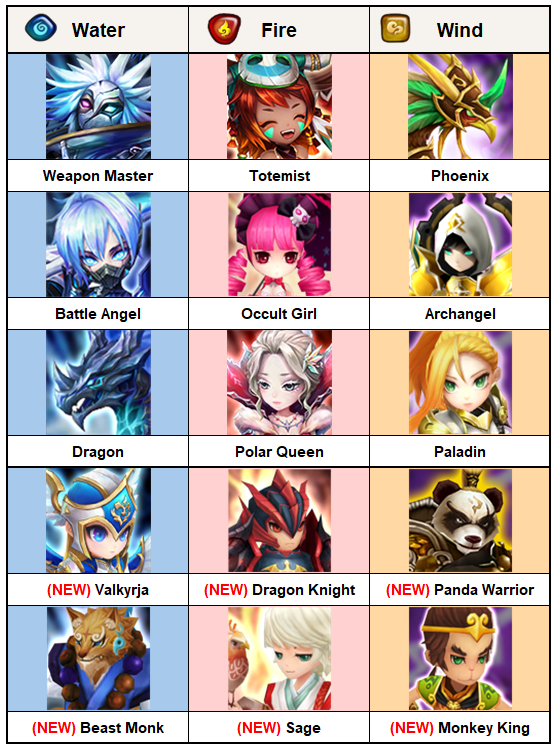
Summon a default 5★ Monster at [MAX Skill Level / 6★ / Lv. 40 / Awakened] status from a list of 15 with newly added Monsters.
You can also select and summon 3 Monsters for each attribute from a list of default 4★ Monsters (10 Monsters each for Water, Fire, and Wind), and level up the skills of default 5★ Monsters you own up to 5 times and default 4★ Monsters up to 30 times!
Please read below for more info.
■ Event Period
Sep. 1, 7:00 PM - Oct. 25, 7:59 AM PDT
* Rewards available until Oct. 26, 7:59 AM PDT
■ Event Details
===========================================================
★ New & Returning Summoner Exclusive Missions ★
- New Summoner: Summoners who created their account after Aug. 1, 8:00 AM PDT.
<Daily Check-in Gift>
Check in every day to get [(+15) 6★ Rare Rune Set (Select Type), Mana Stone +1,000,000, Unknown Scroll x100] as a gift!
- You can repeatedly craft Rune Sets with the same [Rune types (4-set & 2-set)] without limit, excluding Intangible Runes.
- The prefix property, main property, and sub properties of Runes are given randomly.
<Use Energy Mission>
Use Energy during the event period to earn up to 1,000 Fever Tokens!
- Use 100 Energy: Fever Token x20 (Up to 50 times)
* Daily check-in and Energy usage missions reset daily at 8:00 AM PDT.
* Daily check-in gifts reset daily at 8:00 AM PDT.
===========================================================
EVENT 1. Default 5★ Monster MAX Summon Event
Summon a Monster with [MAX Skills / 6★ / Lv. 40 / Awakened] from the upgraded list of 15 default 5★ Monsters.
You can also change your selection once among them.
[Default 5★ Monster List]
[How to Earn Fever Tokens]

- Content Drop: 1 to 3 Fever Tokens based on Energy used
- Run Scout Battle for 1 Hour: 5 Fever Tokens
- Use 100 Crystals: 20 Fever Tokens
* Please check the event page for more details.
[Default 5★ Monster Summon and Change Cost]
▶ Default 5★ Monster Summon: -100 Fever Tokens
▶ Default 5★ Monster Change: -300 Fever Tokens
* You can change the summoned Monster after [Sep. 19, 8:00 AM PDT].
* The summoned Monster will be deleted (unsummoned) when changing it for another Monster.
* {You cannot change the Monster if its information cannot be found. (Used for Ancient Crystals, unsummoned, unclaimed from the Inbox, etc.)}
* If you change the Monster summoned from the event, the Monster will be marked as deactivated from the Monster Collection.
EVENT 2. Recommended MAX Rune Set Giveaway Event
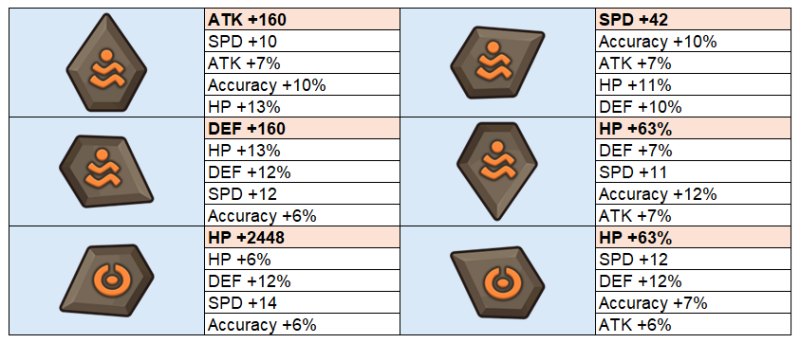
Get all 4 Rune Sets with Power-up Lv. 15 that suit different Monsters!
▶ Rune Set (Limit: 4): -30 Fever Tokens (120 in total)
1) Rage + Blade Set
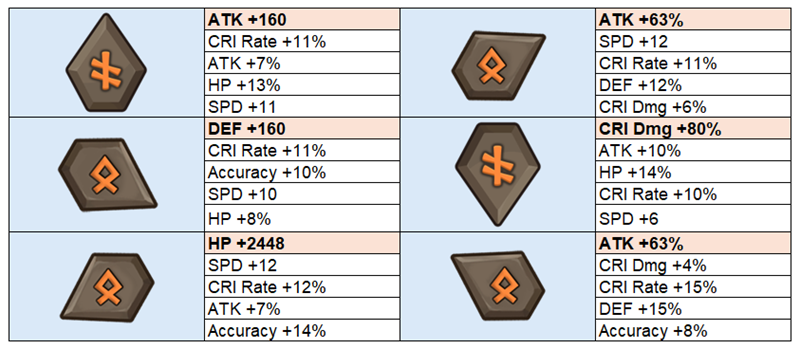
2) Despair + Will Set
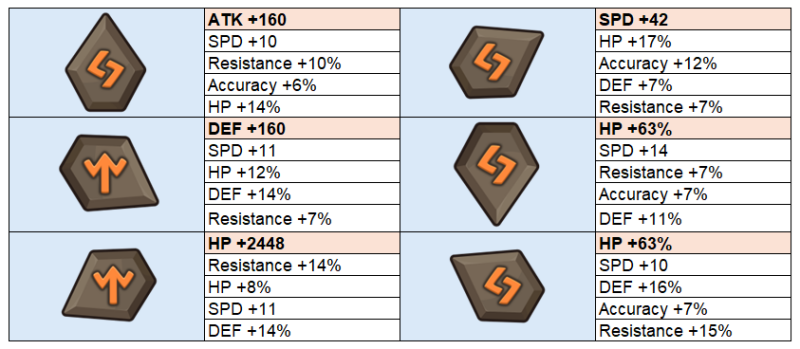
3) Violent + Destroy Set
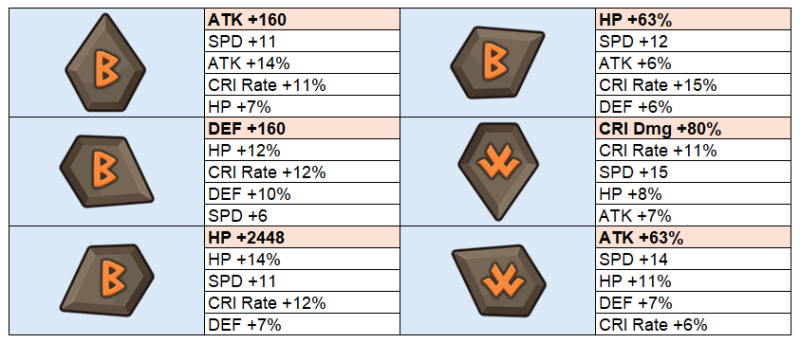
4) Swift + Focus Set
EVENT 3. Default 4★ Monster Selective Summon Event
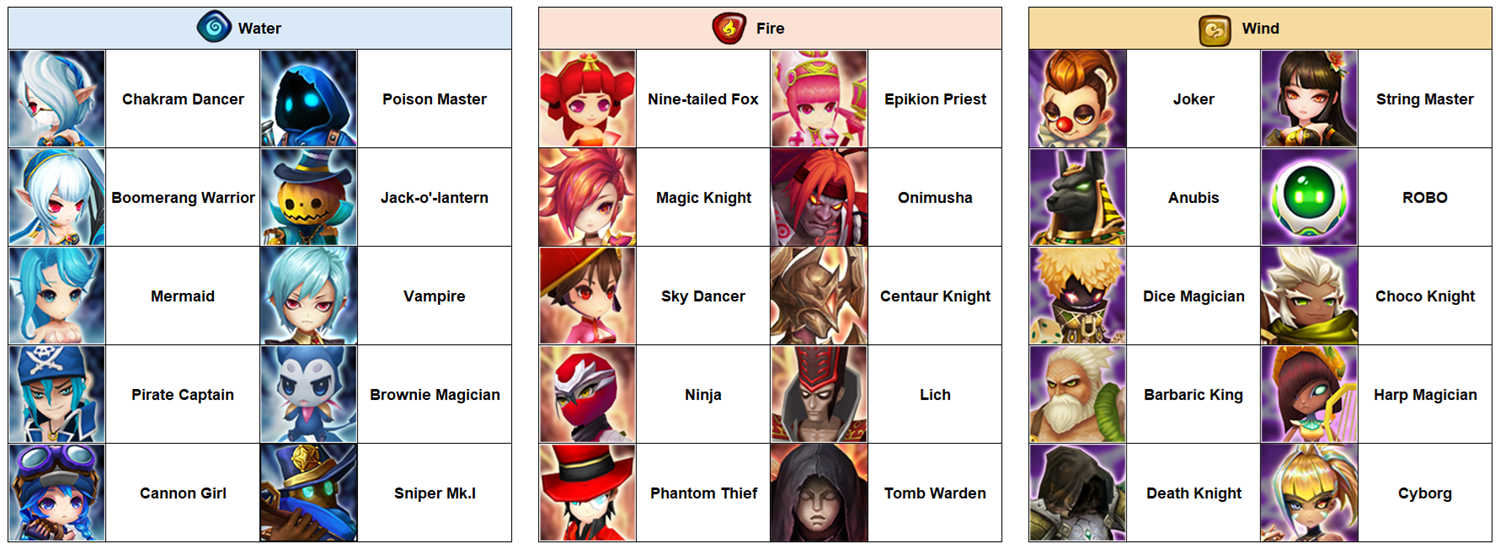
Select and obtain a total of 9 default 4★ Monsters, 3 from each attribute, from the designated list.
[Default 4★ Monster List]
[Default 4★ Monster Summon Cost]
▶ Default 4★ Monster Summon (Limit: 9): -100 Fever Tokens (900 in total)
* Three default 4★ Monsters can be summoned from each attribute.
* Default 4★ Monsters cannot be changed after summoning.
* The same Monster cannot be summoned more than once.
EVENT 4. Default 5★ & Default 4★ Monster Skill Level-Up Event
Level up the skills of default 5★ Monsters up to 5 times, and default 4★ Monsters up to 30 times!
▶ Default 5★ Monster Skill Level-Up (Limit: 5): -200 Fever Tokens (1,000 in total)
▶ Default 4★ Monster Skill Level-Up (Limit: 30): -100 Fever Tokens (3,000 in total)
* Default 5★ and 4★ Monsters you own with skills that are not fully leveled up are eligible.
* Only default 5★ and 4★ Monsters in your Monster Inventory can be loaded. Monsters in the Monster Storage or Sealed Shrine are excluded.
※ Please Read
- Rewards will be available for 24 hours after the event ends.
- Please restart the game if you're playing when the event begins to avoid any delays.
- Please try restarting the game if you don't see your reward in the Inbox.
- The duration and remaining time for the event are displayed in the time zone of the region you reside in.
- For questions or customer support, please contact Com2uS Customer Support by visiting https://customer.withhive.com/com2us/ask/313.
